LJSONedit
LJSONedit (Large/Lazarus JSONedit) is a JSON editor suitable to work with large files.
LJSONedit uses multiple-document interface and UTF-8 encoding.

Native Linux build is available (but Wine works very fine too for Windows executable).

It uses some experience from building JSONedit application, but it is written from scratch with different toolset (Lazarus) and it is unknown if it would be able to match JSONedit functionality fully (result of 15 years maintanance with feedback from tens of users). Depending on your use case, it is likely that JSONedit might be more useful overall.
While JSONedit used tree, list and text views (plus few others for special functions like table editor for arrays), LJSONedit eliminated list view by merging its core functions (filtering) into the tree view.
Editing
While tree view is active, F2 key can be used to edit node name, type or value (depending on current cursor position). Alternatively click on node name/type/value while it is selected to enter edit mode. To confirm editing click elsewhere or hit Enter (or Ctrl+Enter depending on setting when editing multiline strings).
Releases
- 2025.08.31 Version 0.1 (obsolete: links removed)
- distributed as a trial version with trial period of 100 days from the build date - if some serious issues would be found I don't want this version hanging forever on dozens third party sites
- estimated to be suitable to work with ~10x larger files than JSONedit, tested e.g. with 40 MB file containing 2.2 million nodes - 3.7 seconds to load,
1.8 seconds to filter on Haswell-based laptop with ~500MB memory usage

- 5 MB, single executable file (creates configuration file on first run)
- portable, no dependencies
- 2025.09.21 Version 0.2
- added configuration for default node type column width
- changed few messages to MessageDlg
- added configuration for automatic tree nodes expanding on load (expanding up to specified number of levels and up to specified number of visible nodes)
- optimized array elements handling
- tree context menu: added options for expanding recursively up to 20/50/100/200 visible
- tree, click-to-edit: making click position less critical if current string/name is short or empty
- 2025.11.10 Version 0.2.1
- "About" + initial "License" windows: showing both application license text and third party code licenses
- fixed possible "WARNING: TEdit.Destroy with LCLRefCount>0" when editing tree
- massive speedup for "Delete all siblings before/after node" functions
- 2025.11.16 Version 0.2.2
- added document tabs reordering by dragging with mouse
- FIXED: leading/trailing whitespaces are now ignored when editing nodes with number values
- FIXED: file was marked as changed even if name/type/value was not changed during editing if editing was confirmed
- FIXED: value was not kept when changing node type between int and float
- FIXED: value was not kept when changing node type to string
- FIXED: when editing number extra padding spaces were added to default text
- 2026.02.25 Version 0.2.3
- "Save as" dialog: set initial directory to previous one if file exists
- adding star to tab name if file is modified / not saved
- added option to copy to/from clipboard JSON value wrapped with name (compatible with JSONedit)
- FIXED: AV on trial expiration if license was not accepted
- 2026.05.16 Version 0.2.4
- added File / Close All menu item
- added "New" to document tab popup menu
- added log when opening file
- expanding node when child is added
- filled up Name + Description text in XPManifest
- 2026.08.05 Version 0.2.5
- license changed to freeware
- removed 100-day trial period
- 2026.10.08 Version 0.3
LJSONedit_0_3.zip (Windows x64 build)
LJSONedit_0_3_Linux_x64.zip (Linux x64 build)- huge speed gain (2x...10x) for many operations (including 6x for opening big JSON, 10x for saving big JSON); with this release 200MB JSON file was often used for testing
- about 30% less memory use when loading big documents
- filtering and then clearing no longer expands whole tree
- node path display when filtering is left-justified
- added CSV import
- added JSONL/NDJSON loading as array and storing array to JSONL/NDJSON
- added Tools/Reformat and Tools/Compact text
- added Tools/Speed test and Self test
- added setting disabling checking for duplicated node names
- added settings for Text view size limit and highligher limit (Text view is much slower than tree view)
- nearly 3 dozen fixes
- using Lazarus 4.8, FPC 3.2.2
- opening: 11.5s
- RAM usage: 8.3GB
- filtering for "data" text: 13s
- clearing filter: 5s
- Tree view / Expand all action: 5.8s
- saving (formatted: 1.3GB output): 7s
- most of other operations like editing, scrolling: instantaneous
- 2026.10.11 Version 0.3.1, adding bunch of small features from JSONedit, some icons from Lazarus and toolbar in the main window
LJSONedit_0_3_1.zip (Windows x64 build)
LJSONedit_0_3_1_Linux_x64.zip (Linux x64 build)
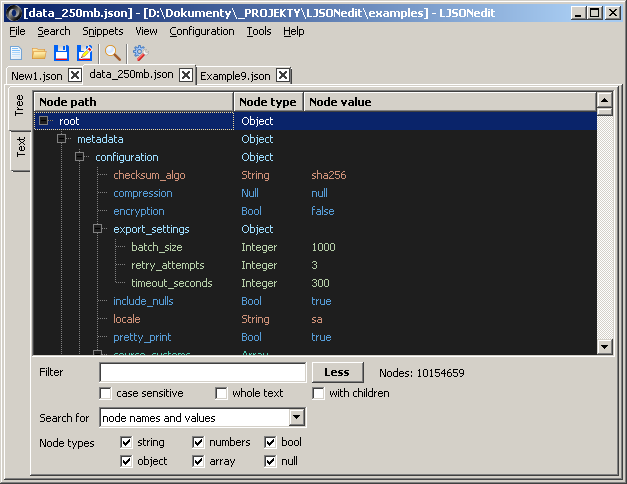
- filtering: "with children" option shows whole subtrees of matching nodes
- added Search / Find (Ctrl+F), Find next (F3), Find previous (Shift+F3): names and/or values, case sensitive, whole text; nodes hidden by filter are skipped
- tree context menu
- Wrap node (in object / in array)
- Sort children by name or value, ascending / descending, optionally recursive
- Copy special: name, value (strings without quotes), compact JSON, formatted JSON, JavaScript (keys without quotes), C string literal
- tree node colors by JSON type (Settings / Tree): text colors, pastel backgrounds (as in JSONedit), dark, dark with pastel backgrounds
- added Tools / Duplicated values: values occurring more than once (strings, numbers, optionally true/false/null, objects and arrays, separately per member name), with paths of all occurrences; go to node, filter tree by value
- added Tools / Validate text (Ctrl+Shift+V): checks text view text without switching to tree, moves cursor to error
- added Tools / Relaxed JSON parser (like JSONedit relaxed parser)
- added Snippets menu (as in JSONedit): 20 slots to store selected node and load it in place of selected node later, rename, delete, copy to clipboard; stored in snippets\NN.json next to exe, same format as JSONedit (its snippets can be copied)
- added File / Export CSV: array of objects (header from member names), array of arrays or object of column arrays; field separator as in last CSV import
- added File / Save as JSON Lines; save dialog: file type preselected from document name, extension of selected type added to names without extension
- added File / Open containing folder (also in document tab menu)
- files changed by another program are detected when application is activated; asks whether to reload (warns about unsaved changes)
- asks before opening large files (Settings / General, default above 250 MB, 0 = never; settings show estimated memory use for the limit)
- main menu: icons for common items (new, open, reload, save, save as, import/export CSV, exit, find, settings, RFCs, about; Lazarus general purpose images, CC0)
- toolbar above documents (new, open, save, save as, find, settings; can be hidden with View / Toolbar or Settings / General)
- added View / Always on top
- Help menu as in JSONedit: RFCs window (RFC 8259, 7493 I-JSON, 7159, 4627, 5234 ABNF embedded, available offline; text search), Go to json.org
- Settings window can be closed with Esc (Cancel)
- few minor fixes